-
October 13, 2026
-
3 Views
Monthly Bookkeeping Checklist for Small Businesses: Monthly, Quarterly and Year-End
A monthly bookkeeping checklist has five jobs: record every transaction, reconcile your bank and card accounts, follow up on unpaid invoices and bills, review your reports, and close the month. Every three months you add tax and payroll checks, and once a year you close the books and prepare for tax filing.
Most bookkeeping trouble does not come from one big mistake. It comes from small jobs that slip, a reconciliation skipped in March, a bill left unpaid in May, until the year-end cleanup takes weeks. A simple monthly bookkeeping checklist fixes that by turning the work into a routine you can finish in a few focused sittings.
This guide gives you that routine in three layers: what to do every month, what to add every quarter, and what to finish at year-end. It is written for US small businesses and works whether your books live in QuickBooks, Zoho Books, Odoo or a spreadsheet you are about to retire.
What belongs on a monthly bookkeeping checklist?
A monthly bookkeeping checklist is a repeatable list of tasks that keeps your records accurate and your numbers current, finished soon after each month ends. The goal is simple. By the time you open your reports, you can trust them.
Monthly matters because errors are easiest to find while the month is fresh. A missing receipt from three weeks ago is a quick search. The same receipt a year later is a guessing game. Regular books also give you a true picture of cash, which is what decides whether you can hire, buy stock or ride out a slow season.
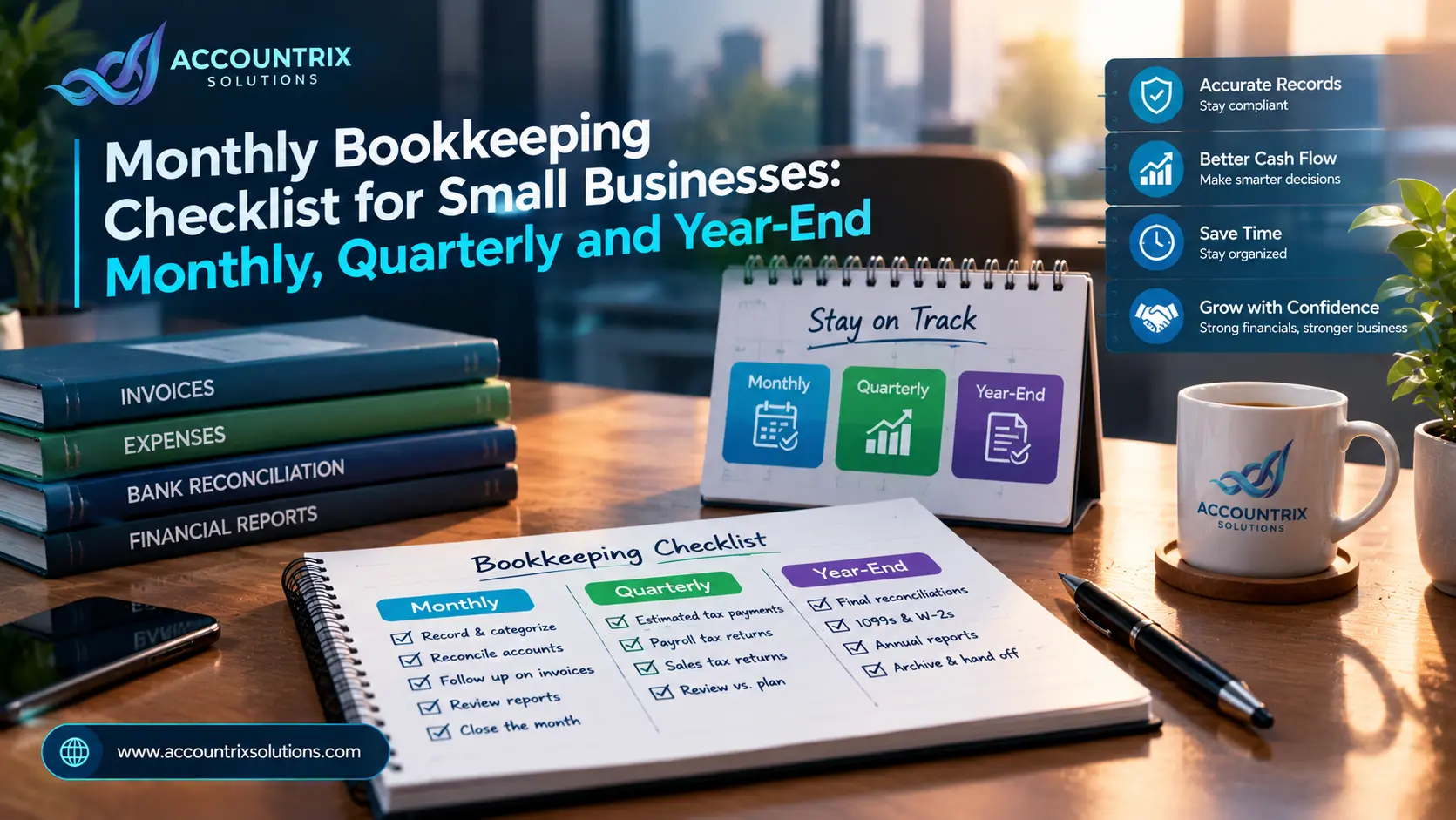
The quarterly and yearly tasks sit on top of the monthly routine. If the monthly work is done, they take far less time. This calendar shows how the three layers fit together.
Your monthly bookkeeping checklist, step by step
Here is a month-end rhythm that suits most small teams. The week numbers are a suggestion, not a rule. What matters is the order, because each step depends on the one before it.
Five of these steps deserve a closer look, because they are where most small businesses either catch problems early or miss them for months.
Capturing and categorizing: the foundation
Every later step depends on this one. Record every sale, expense and refund, attach the receipt or invoice, and give each transaction a category. By month-end, your uncategorized bucket should be empty.
Three slips show up again and again here: personal spending coded as a business cost, the same expense filed under different categories from month to month, and sales tax lumped into revenue. Each one quietly distorts your reports, so check for them before you move on.
Bank reconciliation: the check that catches most errors
Reconciling means comparing your books to your bank or card statement, line by line, until the difference is zero. When it is not zero, the cause is usually one of four things: a timing difference, a duplicate entry, a missed fee, or a plain typing mistake. Each one is easy to fix this month and annoying to untangle next quarter.
If your books are in QuickBooks, a bookkeeper who reconciles every month keeps this from piling up, which is exactly what our QuickBooks bookkeeping services are built for.
Payment processors need extra care. A payout from Stripe, PayPal or Shopify is not one sale. It is many sales minus fees and refunds, so it will never match a single invoice. Record the fees separately, and match the payout to the group of orders behind it. If your sales run through an online store, a proper connection built through Odoo integration services can bring order, fee and refund data into your books already itemized, which makes payouts much easier to match.
Receivables and payables: where cash gets stuck
Money owed to you and money you owe are the two lists that decide your cash position. Review the unpaid invoice list every month and sort it by age. Anything past due deserves a reminder this week, not next month. On the bill side, check what is due before the next close, so you pay on time and avoid late fees.
Teams on Zoho Books can hand this routine to our Zoho bookkeeping services team, so reminders and payments happen on schedule even in busy weeks.
The three reports to read every month
Your software can produce dozens of reports. Three of them tell you most of what you need to know.
- Profit and loss. Did you make money this month, and which costs moved the most?
- Balance sheet. What do you own, what do you owe, and does anything look odd?
- Cash flow. Where did the cash actually go, and how long will it last?
Compare each report with last month and with your budget. A big change is not always a problem, but it should always have an explanation. If you run Odoo, our Odoo bookkeeping team can prepare these reports and walk you through what changed.
Closing the month
Once everything ties out, lock the period. Most accounting tools, including QuickBooks, Zoho Books and Odoo, let you set a lock or closing date so nobody changes old entries by accident. Then save the reports and statements for that month in one folder. Closing is a small step that protects all the work above it.
Set up your system so the checklist stays short
A checklist is only as easy as the system behind it. A few one-time setup steps will cut your monthly workload noticeably.
- Use bank rules. Most tools can auto-categorize repeat transactions, such as rent or software subscriptions.
- Capture receipts as they happen. Snap a photo or forward the email the same day, instead of hunting for paper in March.
- Keep your chart of accounts short. Too many categories make reports harder to read and mistakes easier to make.
- Set recurring invoices and bills for anything that repeats on a schedule.
- Keep business and personal money apart, including cards.
- Book the month-end slot in your calendar and treat it like a client meeting.
None of this takes long to set up, and every item pays you back every single month.
Quarterly bookkeeping checklist
Every three months, add a second layer on top of your monthly routine. These tasks are about taxes, compliance and stepping back to see how the business is really doing. Exact deadlines depend on your business structure and state, so treat the items below as prompts and confirm the dates with your accountant.
Quarter-end is also the best moment to ask your accountant one question: based on profit so far, are my tax payments on track? A short call now is cheaper than a surprise in April.
Year-end bookkeeping checklist
Year-end is easy when the other eleven months were done properly, and painful when they were not. Think of it as four folders you close one at a time.
- Finish reconciliations for every account through the last day of the year
- Clear uncategorized and unmatched items
- Record depreciation, prepaid and accrued items with your accountant
- Count inventory and adjust values if you hold stock
- Send 1099-NEC forms to contractors and W-2 forms to employees, generally by the end of January, as the IRS explains on its Form 1099-NEC page
- Review sales tax and payroll filings for the full year
- Run the full-year profit and loss, balance sheet, cash flow, trial balance and general ledger
- Gather loan statements, asset purchases and owner contributions
- Send the package to your accountant or tax preparer
- Lock the year in your software
- Save a copy of reports and statements outside the software
- Keep records as long as the IRS requires: generally three years, and at least four for employment tax records, per the IRS recordkeeping guidance
Mistakes that make month-end painful
The one-page version
Screenshot this or print it and keep it next to your desk.
When to hand the checklist to a bookkeeper
You can run this checklist yourself, and many owners do for years. It is worth handing over when one of these starts to sound familiar:
- You skip months and plan to catch up later
- Month-end takes you more than a day
- You do not fully trust the numbers on your reports
- You hold inventory, run payroll or manage more than one company
The team at Accountrix Solutions includes qualified accountants who run this routine for clients on QuickBooks, Zoho Books and Odoo. You keep full visibility of your numbers, and the checklist gets done every month whether you are busy or not.
Frequently asked questions
What is a monthly bookkeeping checklist?
It is a repeatable list of tasks you complete after each month ends: record transactions, reconcile accounts, follow up on invoices and bills, review reports and close the period.
How long does month-end bookkeeping take?
It depends on your transaction volume and how often you reconcile. A small business with tidy books can often finish in a few hours. A backlog takes much longer, which is why monthly beats yearly.
What should I do first at month-end?
Make sure every transaction is recorded and categorized. Then reconcile your bank and card accounts, because the rest of the checklist builds on accurate balances.
How long should I keep bookkeeping records?
The IRS generally suggests three years, and at least four years for employment tax records. Some records need longer, so ask your accountant about your situation.
Do I still need to reconcile if I use bank feeds?
Yes. Feeds bring transactions in, but reconciling confirms they match your statement and that nothing is missing or duplicated.
Can I use the same checklist in QuickBooks, Zoho Books and Odoo?
Yes. The tasks are the same in every tool. Only the screens and button names differ.
Final thoughts
A good monthly bookkeeping checklist is not complicated. It is a short list you repeat every month, with a few extra tasks each quarter and a tidy close each year. Record, reconcile, follow up, review and lock. Do that consistently and year-end stops being a scramble.
If you would rather have someone else keep the routine running, talk to our team. We will look at how your books are kept today and tell you honestly what needs attention.
Top Category
- Blog (12)
Recent Posts
Bookkeeping vs Accounting: Which Does Your Business Need?
Odoo Studio vs Custom Module: Which One Should You Use?
Popular Tag
Related Articles
Bookkeeping vs Accounting: Which Does Your Business Need?
-
October 14, 2026
-
3 Views
Odoo Studio vs Custom Module: Which One Should You Use?
-
October 13, 2026
-
3 Views
Odoo 17 End of Support: How to Upgrade Without Breaking Your Customizations
-
October 9, 2026
-
5 Views
Leave a comment